
History and favorites
Every time TransOne finishes a translation, it quietly saves the result. You do not have to do anything. Later you can search everything you have translated, open any entry again, and star the ones worth keeping. Everything stays on your Mac.
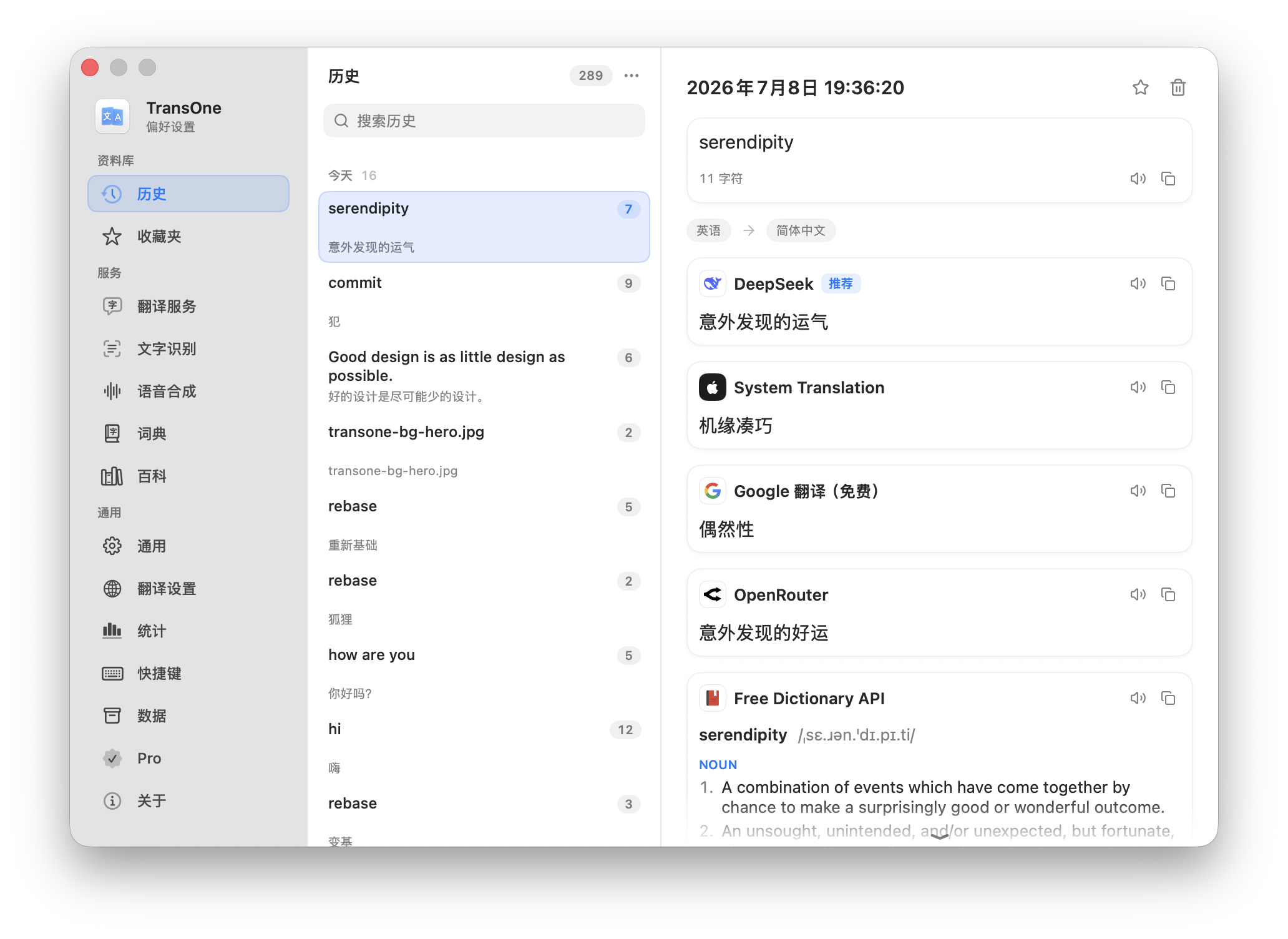
What gets recorded
Each successful result from the translation window becomes one history entry. An entry holds everything that came up for that text:
- the source text you translated,
- the language pair (what it was translated from and into),
- every translation, and any dictionary, encyclopedia and study result that appeared alongside it.
Translating the same text again with a different engine does not add a second entry. TransOne finds the existing one and adds the new result to it, so your history stays tidy.
Favorites are starred history
Favorites are not a separate collection. A favorite is just a history entry you have starred. Star an entry and it shows up on the Favorites page as well; remove the star and it stays in History like any other entry.
There are two ways to star something:
- In the translation window, click the star in the toolbar after a translation.
- In the History or Favorites list, right-click an entry and choose Favorite.
Open your history
- In the translation window, click the History button in the toolbar. It drops down your most recent translations right there; click one to bring it back without leaving the window, or click View All History… at the bottom for the full page.
- Or open Preferences from the menu bar icon and go to Settings ▸ History.
Favorites has its own page in the same window, under the Library group in the sidebar. See Settings explained for the full sidebar.
Search and browse
Type in the search box at the top to filter your entries. The search looks through the source text, the translations, and the dictionary, encyclopedia and study content, so you can find an entry by any word that appeared in it, not only the text you typed.
Entries are grouped by when they happened: Today, This Week and Earlier.
Manage entries
Right-click any entry for three actions:
- Add to Favorites / Remove from Favorites: star or unstar it.
- Copy: copy its text.
- Delete: remove that one entry.
The … menu in the top-right of the page has two more:
- Keep History: how many entries to keep (see below).
- Clear History…: remove your whole history at once.
Clear History… asks you to confirm first. Lowering Keep History to a smaller number, on the other hand, takes effect immediately: it drops the oldest non-favorite entries beyond the new limit right away, with no confirmation, so lower it deliberately. Favorites are always kept.
How much is kept
Keep History sets the maximum number of entries: 50, 100, 200, 500, 1000 or Unlimited. The default is 500.
When you reach the limit, TransOne drops the oldest entries to make room. Your favorites are never dropped, no matter how old they are, so starring an entry is also a way to protect it.
Privacy
Your history lives on your Mac and nothing about it is ever uploaded. There is no account and no server involved. See Privacy and your data.
Image Translation results are never recorded, so nothing you translate over an image ends up in your history.
To be clear, there is no switch that turns recording off completely. If you want to keep as little as possible, set Keep History to 50 and use Clear whenever you like.
A backup includes your history and favorites, so they can move with you to a new Mac. Restoring a backup replaces the history already on that Mac.