
Text recognition
Text recognition, often called OCR, turns a picture of text back into real, readable text. TransOne uses it whenever you capture part of your screen: in Screenshot Translation, Screenshot OCR and Image Translation. When you draw a box, a recognition engine reads the words inside it, and only then does anything get translated.
Only one recognition engine is active at a time. To choose it, open Preferences from the menu bar icon and go to Settings ▸ Text Recognition.
The engines
| Engine | Key needed | Notes |
|---|---|---|
| System (On-Device) | No | Default. Works offline, uses Apple's built-in recognizer. |
| OpenAI | Yes | Base URL, Model and API Key. The model must accept images. |
| Baidu OCR | Yes | API Key and Secret Key. |
| Tencent OCR | Yes | Secret ID, Secret Key and Region. Keys from the CAM API key page. |
| Tencent Image Translation | Yes | Secret ID, Secret Key, Region and Target. Used for recognition only. |
| Youdao OCR | Yes | App Key and App Secret. |
| Google OCR | Yes | API Key. Uses Google Cloud Vision; enable the Vision API first. |
| Volcano OCR | Yes | Access Key ID and Secret Access Key. |
An API key is a private code you get from a service to prove a request is yours. The System engine needs none, so most people never have to think about keys here. See Translation engines for how keys work and where they are stored.
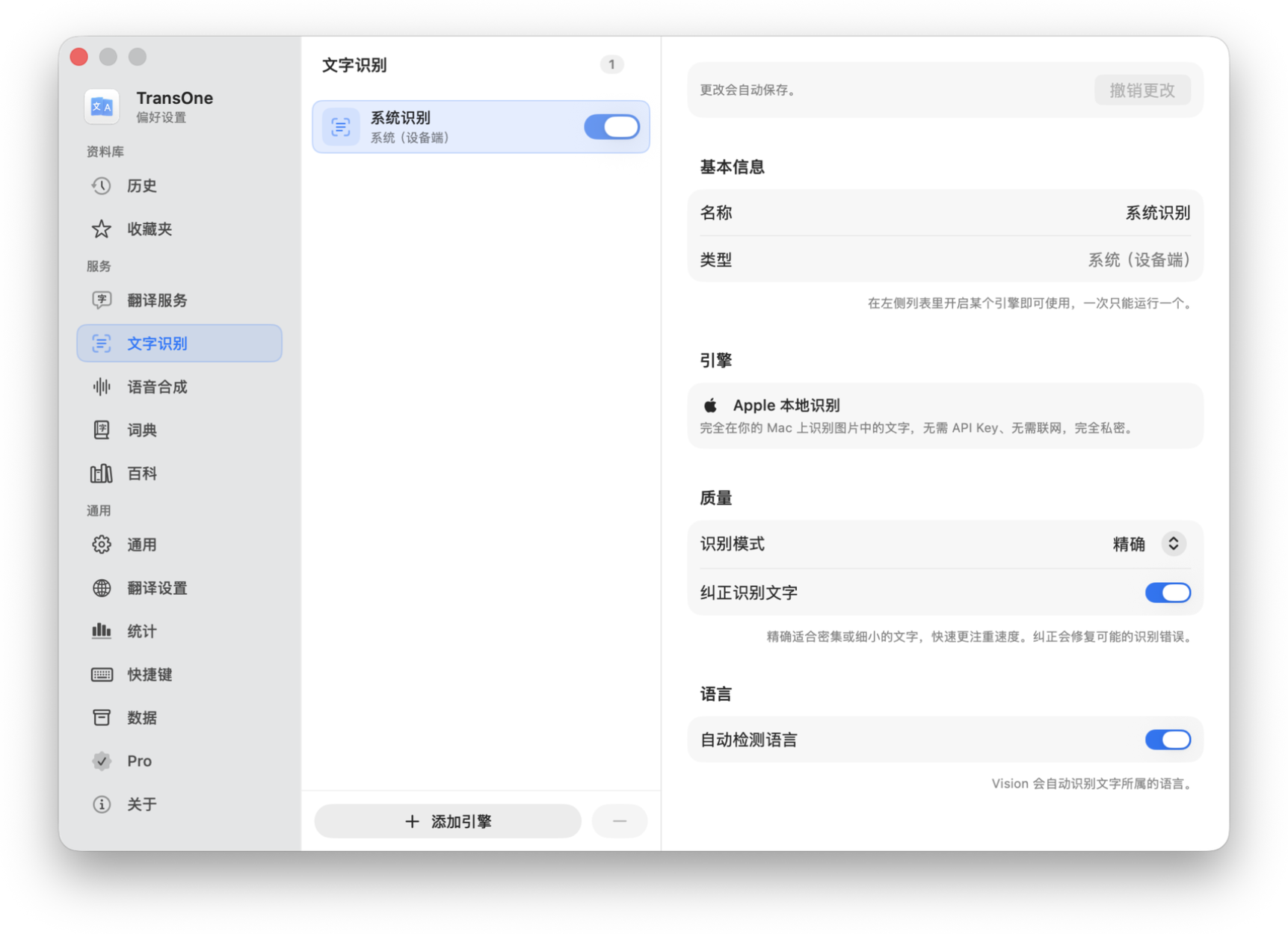
System (On-Device)
The System engine is the default. It runs entirely on your Mac, so it is free, works without a connection, and never sends your captured image anywhere. It has a few options.
- Recognition: Accurate or Fast. Accurate reads more carefully and handles awkward or low-quality text better; Fast returns the text sooner and is fine for clean, ordinary text. Accurate is the safe choice if you are unsure.
- Correct: applies language correction, cleaning up the recognized text using what it knows about the language (fixing an obvious wrong character, for example).
- Languages: either automatic detection, or a list of languages you tick. This tells the recognizer which languages to expect.
Out of the box, automatic detection is off, and the ticked list is Simplified Chinese, Traditional Chinese, English and Japanese. So if you scan text in a language that is not on that list (Korean, say, or French), the recognizer may miss it. Fix it in one of two ways: add that language to the list, or turn on automatic detection.
TIP
If you only ever scan the four default languages, leave this as it is. Add a language only when you actually need it, since a shorter list can be a little more accurate.
Which engine should I pick?
Start with System (On-Device). It is free, offline, private, and good enough for most text. Switch to a cloud engine only if the System engine keeps misreading your particular material, for example dense screenshots, unusual fonts, or a language it handles poorly. A cloud engine needs a key and sends the captured image to that service, so there is no reason to use one until you need it.
Where the text goes
Recognized text lands in the input box of the translation window (or, for Image Translation, on the overlay itself). The captured image is used to read the text and then discarded. It is not saved.
Related
- Screenshot and image translation, the three actions that use recognition.
- Translation engines for how API keys are stored and used.